
Getting a VAT Receipt
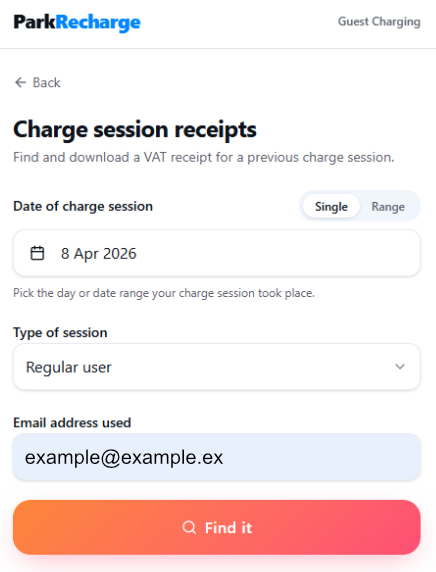
Please visit parkrecharge.me/receipts and enter the date of your charging session to find your receipt.
If you need receipts for multiple charging sessions, change the search option from “Single” to “Range” to view multiple transactions.
Select the session type your looking for, this will be either;
1. Contactless Payment Terminal (Onsite payment device)
2. Guest Payment (Through ParkRecharge.me)
3. ParkRecharge App Account (Regular Users)
If you used a contactless payment terminal, you’ll be asked to enter the last four digits of your payment card along with the charger ID.
If the charging sessions were paid for using the ParkRecharge app or guest payment, you’ll be asked to enter your email address.
Then click 'Find it'.
----------------------------------------------------------------------------------------------------------------
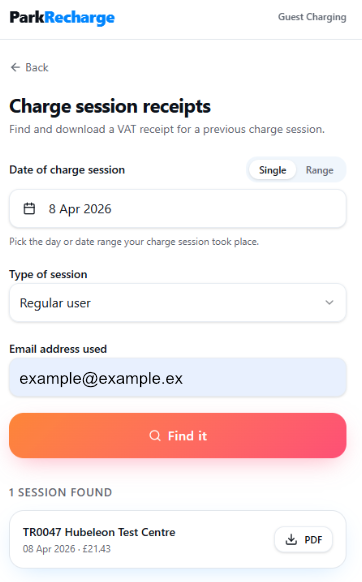
At the bottom of the page you will now see any charging session that matches your search criteria. Tap on the 'PDF' button to download your VAT receipt.
----------------------------------------------------------------------------------------------------------------
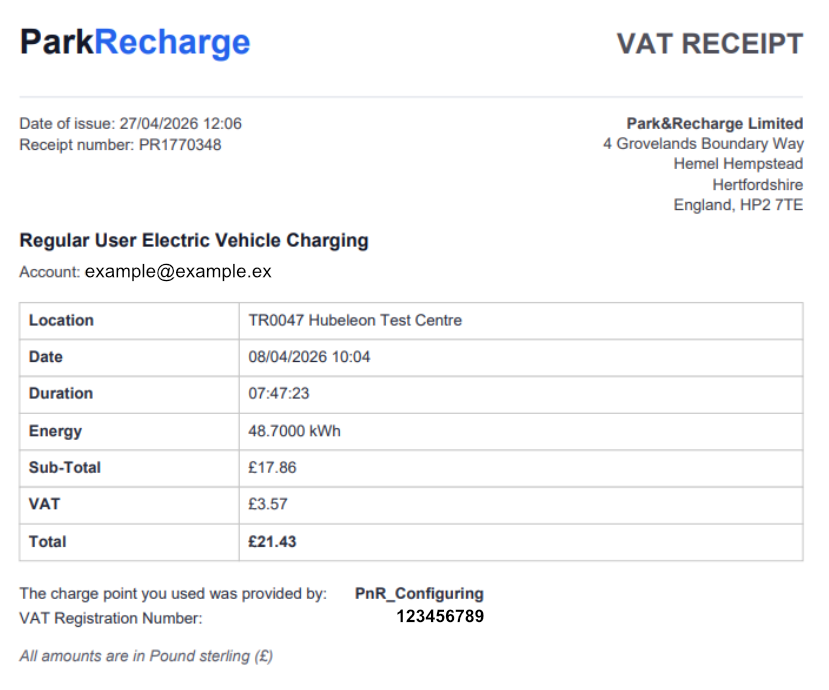
The download will include a receipt as per the example below, showing the total cost of your charging session.
Please note, this does not include parking payment unless specifically stated.
----------------------------------------------------------------------------------------------------------------
FAQ's and useful information
What is the difference between Contactless Payment, ParkRecharge Account and Guest Checkout?
- Contactless Payment - Some chargers have a contactless payment terminals available. Please note most chargers have built in RFID card readers which are often mistaken for contactless payment readers - if you used an RFID card to start your charging session, it will be linked to a ParkRecharge Account. For more information about Contactless Payment Terminals, please read this article.
- Guest Checkout - Pre-authorisation payment made through ParkRecharge.me. This option is only available for chargers on the Public ParkRecharge app but may not be available at some restricted sites. For more information about Guest Checkout, please read this article.
- ParkRecharge Account - Users who create and account on the ParkRecharge app for regular use. For more information about the ParkRecharge app, please read this article.
Issues with email addresses
It is not uncommon for users to use multiple email addresses on our system, either intentionally or accidently which can created confusion when requesting receipts. In some cases where me manage work place chargers, we see users register an account with their personal email but make payments using their work email or vice versa. We also use multiple payment providers (i.e. Stripe, ApplePay, Paypal, etc.) where you may have alternative payment information stored.
If requesting a receipt for a ParkRecharge account payment, be sure to enter the email address used to login to your account, not the email address used with the payment provider.
When requesting a receipt for a guest payment, use the email address entered on the first page of ParkRecharge.me.
For more information about ParkRecharge services, please refer to our knowledge base
Having Issues?
Our customer support team are here to help!
Phone: 0808 186 1851
Email: support@parkrecharge.net
Online: https://parkrecharge.freshdesk.com/support/tickets/new
Was this article helpful?
That’s Great!
Thank you for your feedback
Sorry! We couldn't be helpful
Thank you for your feedback
Feedback sent
We appreciate your effort and will try to fix the article